

Following an invitation to exhibit at Xaraz gallery in Second Life (SL), I was invited to speak at another, the Grove Country Club, about my work, with an emphasis on the application of augmented reality (AR).
Artivive relies on static images which are paired on the platform’s bridge with the layer to be activated by the app. Displaying paintings in SL means turning a cube into a flat board of an appropriate size and applying the image of the painting to one surface as texture. As far as I could tell, no one had tried to activate an image embedded with AR in a virtual environment prior to my exhibition and so I am obviously claiming this as a world (real and virtual) first! It seemed to me that this audience of builders would have no trouble managing the target/AR mapping.
The presentation was in three parts, or intended to be but see the final paragraph. The first was an introduction to what is possible, using short clips made from in-app recordings of the Artivive enabled AR in action.
The second, a PowerPoint loaded into its own player and showing the process of linking a target image with, for instance, a video overlay on the Artivive bridge [see below]
And the third, a video made from live clips of the Artivive image pairing process. The screen capture quality was less than perfect but, on the principle that some kind of imagery is better than none at all, it is likely to be servicable.
I had taken the view that people unfamiliar with Artivive might be more inclined to consider learning how to use it if they could see some examples so I planned to begin by showing some videos taken within the Artivive app (in-app) of live installations, moving on to the PowerPoint describing the process of pairing images on the Artivive deck and including some large images on which people could try out their app, and ending with a video showing the steps through the various screens they would see in making their first AR enabled image [see above].
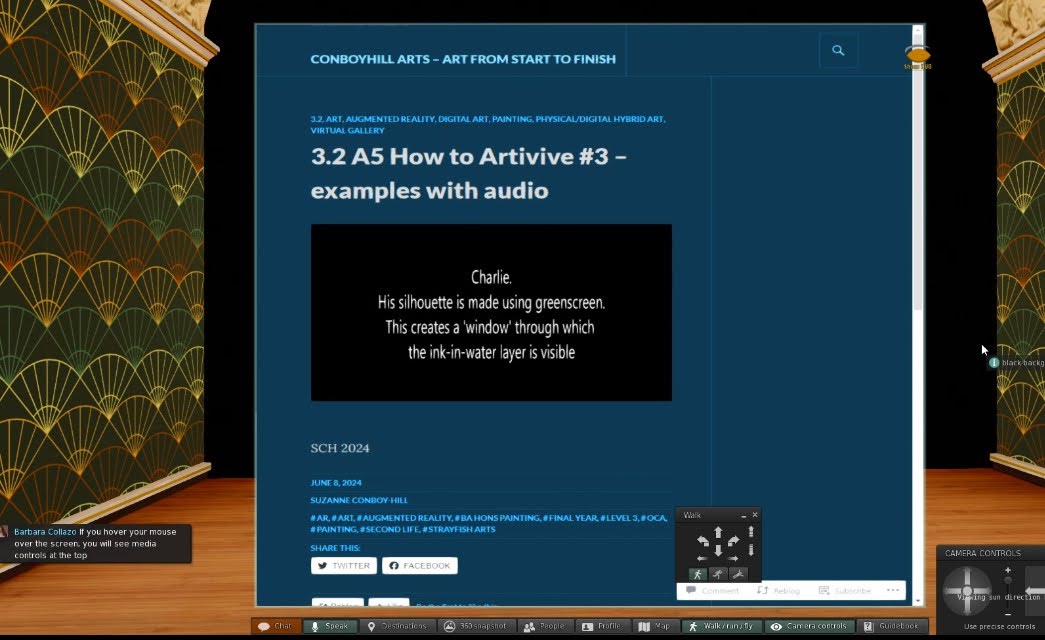

In any normal context, this would have worked well. The audience experiencing the same media at the same time, and my talk-through of each element giving context, expansion, and depth.
But SL is not a normal context and giving a talk there is absolutely an other-worldly experience where nothing operates the way it does IRL. Members of your real world audience don’t, for instance, turn up riding a unicorn made of balloons and, while there is powerpoint and video equipment which you load as usual with your material, you have to build it yourself and it can be operated by everyone.
I had imagined I would use these in the same way as always – progressing and halting each as I made points around what was on-screen. But I had forgotten that, even though we’re all in the same virtual environment at the same time, we are each generating our own instance of that environment. This means that, rather than sharing a screen as with a Zoom video or PowerPoint, everyone has their own iteration of the media players on their screen which they operate independently of anything the speaker does and so it’s impossible to know who in the audience is seeing what at any given time. I had uploaded all three media to my blog and YouTube so I could at least give people access, but this is not quite the same as having a realistic expectation that you control the media and build your talk around those images.
What I had also forgotten was to tell my screen capture video app to pick up my voice from my headset and so there is nothing of me on the recording besides a series of green lights over my head indicating that I was speaking. Some people were using voice but took to Chat during the talk. This meant that I could pick up queries along the way and respond later to any I’d missed.
Finally, for most experienced, speakers reading the room gives a sense of where the audience is in their understanding of what’s going on and if they have any problems or questions, but avatar expressions, gestures, and behaviours are programmed and, consequently, no help at all, so in addition to checking that people are literally on the same visual page, you also have to keep an eye on the chat stream or back channel for clues.

In summary, this was probably the most hilarious, attentive, challenging, welcoming, and stark staring bonkers experience I have ever had as an invited speaker! I learned a huge amount about SL in the process, including how to build functional objects from cubes, and how it’s not possible to rely on traditional media players in a setting where everyone is in charge of their own players. I’m not sure how that can be remedied but I am sure I can make some exhaustive searches among the entertainment and remaining academic and disability locations within SL.
And yes, I’d do it again.
A further development from this series of experiences (and a push from my tutor who quite possibly has an over-optimistic view of my 3D manipulation skills) is that I am building my own gallery in SL based on the Bauhaus movement which emphasised simplicity. This will not only be gentle on the eye but seems appropriate to my building skills. A floor, a roof, four walls, and some windows – how hard can it be?





This post comes with huge thanks to Veyot and Wren Carling who gave me these opportunities; and especially to Veyot who got me started on building. First a cube, tomorrow the world!
SCH 2024
 Conboyhill Arts - art from stART to finish
I enjoyed having you at Xaraz Gallery and am excited to watch your new Gallery grow.
LikeLike
Thank you – I loved being there! And in case I haven’t said it enough, you got me started on building; you nudged, suggested, exposed me to expectations, made adjustments, but never once took over or left me floundering. Without you there would be no new gallery so THANK YOU!
LikeLike